
Fallen Lineage Market: Buying, Orders, and Price History
Last updated:
The Market connects buyers and sellers across all servers. Choose the exact equipment configuration or resource you need, compare offers with completed trades, and collect purchases from Keep Storage.
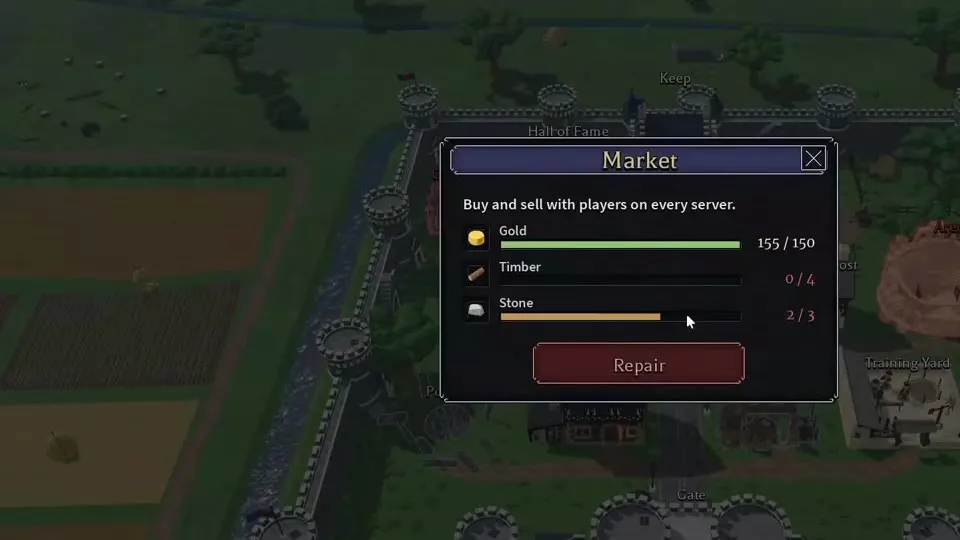
Repair the Market for 150 Gold, 4 Timber, and 3 Stone. For equipment, select an item and grade, compare its listings, then use Buy cheapest and confirm the Gold cost. Resources use Price, Amount, and Total; equipment wanted orders use Wanted at and Place wanted. Collect completed purchases from Keep Storage. Lowest or Cheapest is an asking price, Best wanted is a buyer's offer, and Last sold is a completed sale.
Repair the Market
Open Market in the castle and select Repair once you have the required resources.
| Resource | Repair cost |
|---|---|
| Gold | 150 Gold |
| Timber | 4 Timber |
| Stone | 3 Stone |
The repaired Market lets you buy and sell with players across all servers. Its equipment section has grade-specific offers; Resources includes materials, Jewels, and gem-related items. The interface also provides Normal and Advanced modes.
Completed Market purchases go to Keep Storage. Withdraw them into your carried inventory before using them.
Listings, Grades, and Price Labels
Select an equipment item, then choose F, E, D, C, B, A, S, or Z. Changing the selected grade updates its price, statistics, chart, and listings. Keep Tier, grade, Upgrade, Bonus, and Roll separate when comparing offers: a shared item name does not make two listings identical.
Equipment alignment requirements were removed in the November 13, 2026 update. Check the item's level and class requirements before spending Gold.
Asking prices, wanted prices, and sales
| Label | Meaning |
|---|---|
| Lowest / Cheapest | Lowest asking price |
| Best wanted | Highest wanted offer |
| Last sold | Latest completed sale |
| Today | Displayed percentage change |
| Listed | Current listing count |
| Sold today | Today's completed sales |
| You hold | Your holdings |
| Worth | Value of your holdings |
Lowest or Cheapest is the seller's asking price. Best wanted is the buyer's offer. Last sold records a completed transaction. Compare these separately; an asking price alone does not establish a sale price. A zero under You hold or Worth describes your holdings, not a free item.
Listings and charts
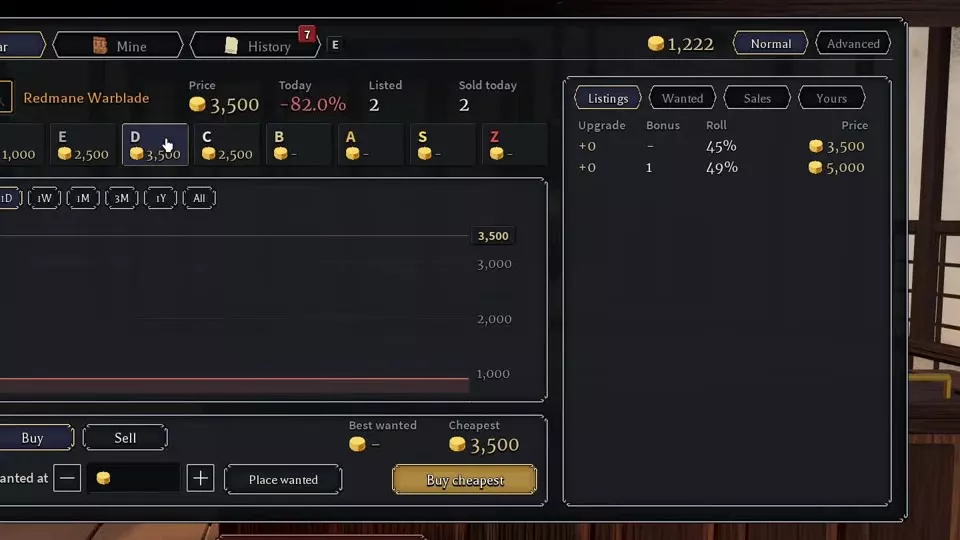
Open Listings to compare the individual offer's Upgrade, Bonus, Roll, and Price. Use Wanted for wanted orders and Sales for completed equipment sales. Resource transactions use Trades.
Select 1D, 1W, 1M, 3M, 1Y, or All to change the chart period. Compare the chart with the selected grade's listings and completed sales rather than treating the chart line as an available offer.
A dash under Price together with Listed 0 means the selected grade has no offer. Choose another available grade or use the wanted-order controls; an empty grade is not a zero-price listing.
Equipment Price Examples by Configuration
These are historical Tier 1 prices. Compare grade and individual configuration before comparing cost.
Redmane Warblade
The item list had 5 offers, starting at 1,000 Gold. Its grade-specific asking prices were:
| Grade | Asking price |
|---|---|
| F | 1,000 Gold |
| E | 2,500 Gold |
| D | 3,500 Gold |
| C | 2,500 Gold |
The individual offers included:
| Grade | Upgrade | Bonus | Roll | Asking price |
|---|---|---|---|---|
| F | +0 | 28% | 1,000 Gold | |
| D | +0 | — | 45% | 3,500 Gold |
| D | +0 | 1 | 49% | 5,000 Gold |
| C | 71% | 2,500 Gold |
The C-grade offer cost less than the cheapest D-grade offer. Higher grade did not force a higher asking price. Within D grade, the 49% Roll, Bonus 1 offer cost 1,500 Gold more than the 45% Roll offer. Pay that premium only when the configuration offers something you want for your build; the price itself does not establish a combat advantage.
Other configured offers
| Weapon | Grade | Upgrade | Bonus | Roll | Asking price |
|---|---|---|---|---|---|
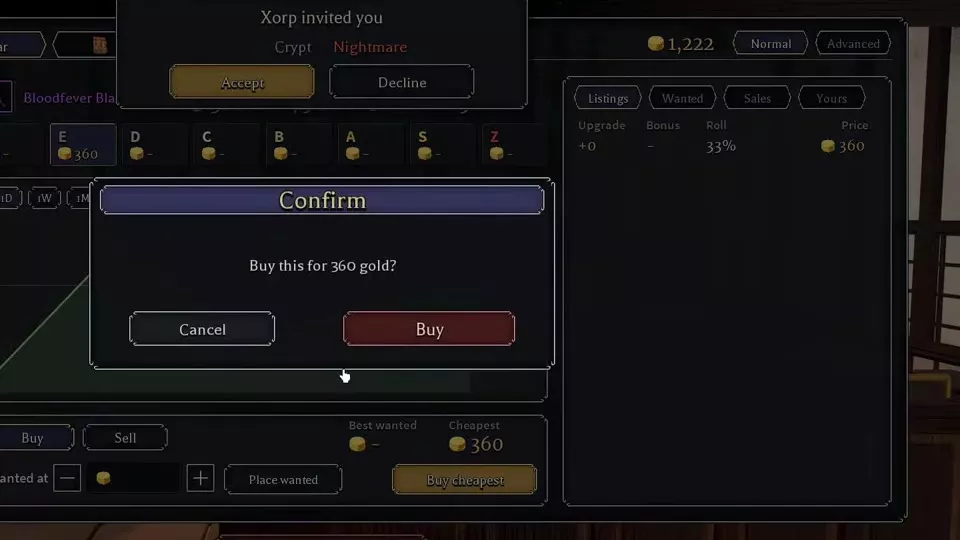
| Bloodfever Blade | E | +0 | — | 33% | 360 Gold |
| Aurelian Oathblade | D | +0 | — | 49% | 2,750 Gold |
| Gravewarden's Blade | C | +0 | — | 71% | 100 Gold |
The Bloodfever Blade purchase completed at 360 Gold. Aurelian Oathblade's D-grade panel paired Best wanted 4 with Cheapest 2,750 Gold: the wanted offer and asking price represented opposite sides of the market.
Grade-specific activity
| Weapon | Grade | Today | Listed | Sold today |
|---|---|---|---|---|
| Redmane Warblade | C | -50.0% | 1 | 2 |
| Redmane Warblade | D | -82.0% | 2 | 2 |
| Bloodfever Blade | E | +75.0% | 1 | 5 |
| Aurelian Oathblade | D | +280.0% | 1 | 2 |
| Gloomthorn | C | 0.0% | 0 | 0 |
Item-list asking prices
| Weapon | Asking price | Listings |
|---|---|---|
| Celtor King's Blade | 1,750 Gold | 2 |
| Hollow King's Sword | 1,400 Gold | 3 |
| Kingsguard Longsword | 400 Gold | 1 |
| Oathsworn Sword | 500 Gold | 3 |
| Packlord's Sword | 180 Gold | 2 |
| Celtor Longsword | 50 Gold | 3 |
Unavailable offers
| Weapon | Selection | Availability |
|---|---|---|
| Bloodfever Blade | S grade | No listing |
| Gatewarden's Sword | Item list | No listing |
| Gloomthorn | C grade | No listing |
Gloomthorn's C-grade Price was a dash, with Best wanted 1. The wanted offer did not supply an item to buy.
Choose weapons by their requirements and effects as well as their configuration and cost. Use the weapon directory to compare those combat properties.
Resource Asking Prices and Completed Trades
The following historical resource prices distinguish the price panel, buy input, and completed trades.
Echo, Nova, and Jewels
| Resource | Lowest | Last sold | Buy Price | Today |
|---|---|---|---|---|
| Echo | 3,000 | 2,500 | 3,000 | +66.7% |
| Nova | 2,000 | 1,500 | 2,000 | -70.0% |
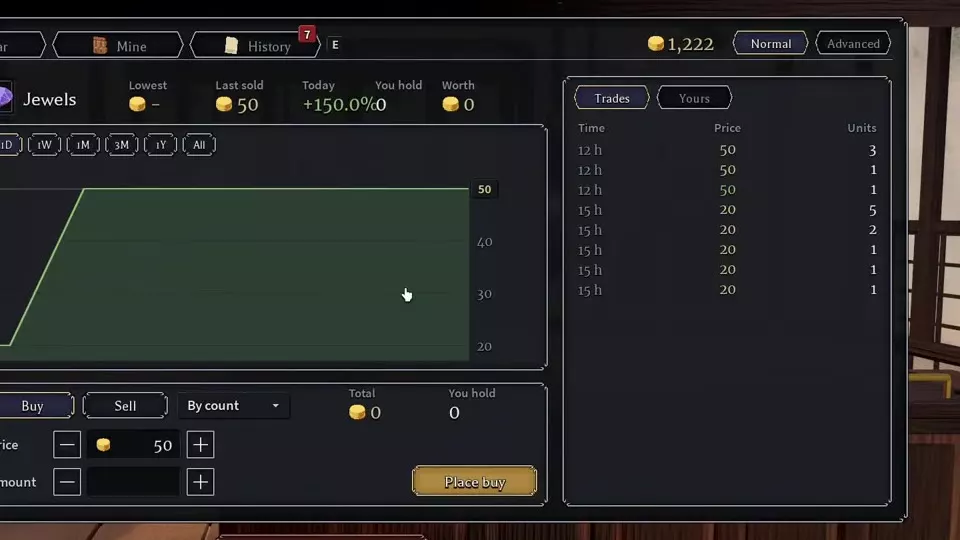
| Jewels | 50 | 50 | +150.0% |
Echo's lowest asking price was 500 above its latest sale. Nova's was also 500 above its latest sale. Use that gap to compare immediate buying cost with completed transactions; the two labels answer different questions.
Echo completed trades
| Trade age | Units | Unit price |
|---|---|---|
| 29 minutes | 1 | 2,500 |
| 3 hours | 1 | 2,500 |
| 4 hours | 1 | 2,500 |
| 4 hours | 1 | 2,500 |
| 5 hours | 1 | 1,000 |
| 5 hours | 1 | 1,800 |
| 8 hours | 1 | 1,500 |
Nova completed trades
| Trade age | Units | Unit price |
|---|---|---|
| 48 minutes | 1 | 1,500 |
| 50 minutes | 1 | 1,000 |
| 6 hours | 1 | 5,000 |
Nova's 5,000 transaction was an older completed trade, while 1,500 was the latest sale in this history. Use the transaction age alongside its price.
Jewels completed trades
| Trade age | Units | Unit price |
|---|---|---|
| 12 hours | 3 | 50 |
| 12 hours | 1 | 50 |
| 12 hours | 1 | 50 |
| 15 hours | 5 | 20 |
| 15 hours | 2 | 20 |
| 15 hours | 1 | 20 |
| 15 hours | 1 | 20 |
| 15 hours | 1 | 20 |
The Jewels rows list unit prices. A three-unit trade at 50 is distinct from a single-unit trade at 50; read the Units column when comparing transactions.
Other resource-list prices
| Resource | Displayed price | Today |
|---|---|---|
| Magic Gem | 100,000 | 0.0% |
| Agility Gem | 50,000 | +400.0% |
| Renew | 25,000 | 0.0% |
| Overload | 5,000 | 0.0% |
| Chain | 2,222 | +10.0% |
| Charge | 2,222 | 0.0% |
| Bloodprice | 2,000 | -61.2% |
| Momentum | 1,300 | 0.0% |
| Retaliate | 1,111 | -11.1% |
| Burst | 1,111 | -45.0% |
| Timber | 1 | |
| Kesbet | 22 |
Strength Gem's Today value was 0.0%. The resource-list price and percentage are separate from the selected resource's completed-trade history. Compare the matching Trades entries before using a list price to judge what buyers have paid.
Buy Equipment and Collect It
- Open the equipment section and choose a category and item.
- Inspect the item's level, class, and Tier. Choose a grade with an available listing.
- Open Listings and compare the offered Upgrade, Bonus, Roll, and Price. Decide whether the cheapest configuration meets your needs.
- Select Buy cheapest. Read the confirmation's Gold cost, then select Buy to accept it.
- Return to the castle and open Keep > Storage.
- Find the purchase with search or category filters, then transfer it from the stored-item panel into the carried-item panel.
- Open Character > Inventory to inspect the withdrawn item and use its available actions.
A historical purchase of an E-grade, Tier 1 Bloodfever Blade cost 360 Gold. That listing had Upgrade +0 and Roll 33%; the weapon required Level 5 and Warrior. Compare requirements and configuration before choosing a low price.
Place Resource Orders and Wanted Prices
Resource purchases
- Open Resources, select the resource, and choose Buy.
- Use By count and enter the Price per unit and Amount you want.
- Review Total alongside the unit price and quantity.
- Use the displayed Place buy or Buy now control. For Echo and Nova, the loaded purchase interface displays Buy now.
Read the button label before submitting: Buy now is the immediate-purchase control, while Place buy is the buy-order control.
Equipment wanted orders
- Select the equipment item and grade you want.
- Set your offer in Wanted at.
- Select Place wanted.
- Open Wanted to inspect wanted orders, or Yours to inspect your entries for that item.
A wanted price expresses what you offer to pay. It is separate from the seller's Cheapest price, so entering a wanted price does not make that price an available sale listing.
Sell and Manage Your Orders
Select the relevant equipment or resource view and open Sell. For resources, review the Price and Amount controls before proceeding.
Use the personal-entry and history tabs to distinguish your active entries from completed transactions.
| Control | Purpose |
|---|---|
| Yours | Your selected-item entries |
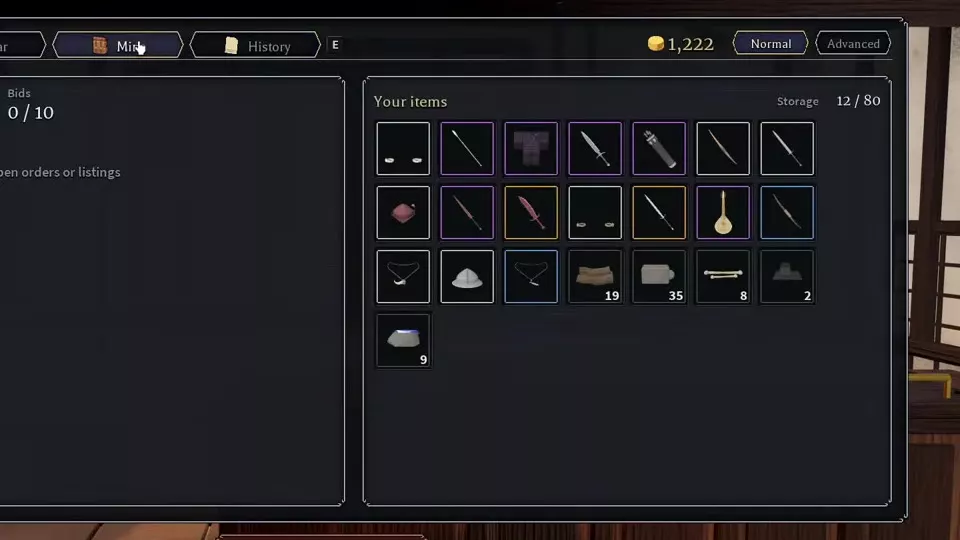
| Mine | Bids, orders, and stored items |
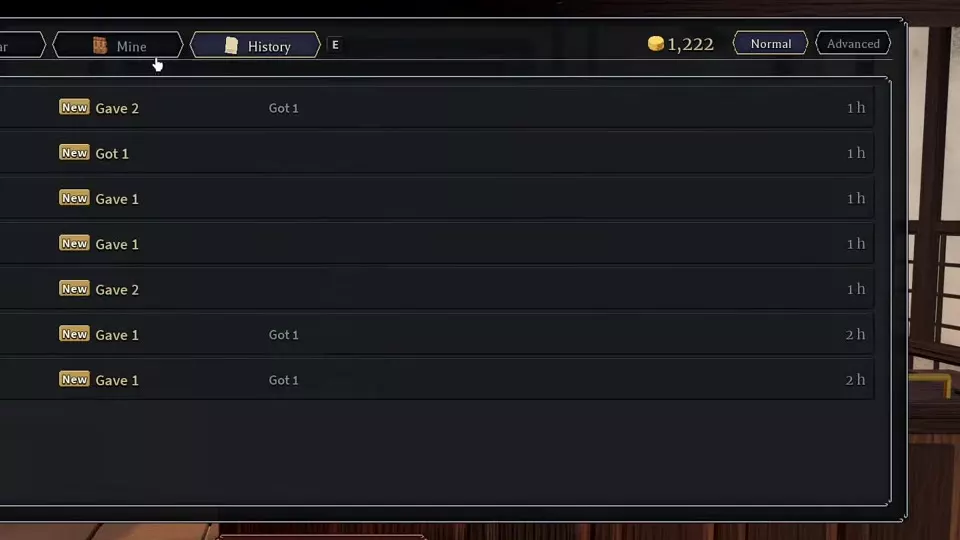
| History | Transaction records |
| Gave | What you gave |
| Got | What you received |
| New | New history entry |
Mine brings together Bids, open orders or listings, and Your items / Storage. In the Tier 1 interface, the Bids counter has 10 bid slots, displayed as 0/10 when empty. This counter applies to bids, not a combined limit for every order type.
Open History to review Gave, Got, and each transaction's elapsed time. For a selected equipment item's completed sales, use Sales; for a resource's completed transactions, use Trades.
Storage, Items, and Direct Trading
- Collect a purchase: use Keep Storage to find the item and move it into your carried inventory.
- Choose equipment: compare slot, level, Tier, and effects in armor and accessories.
- Find resource uses: browse materials, currencies, and Market resources for sources and uses.
- Choose compatible gems: use the Gemcutter and skill gem guide for skill filters and Echo's effect.
- Exchange with a specific player: the Trading Post handles direct trades and gifts between players on the same server, using items in Keep Storage.