
Fallen Lineage Storage and Wipe Retention
Last updated:
Use Keep Storage to put away equipment and materials, retrieve Market purchases, and prepare valuable items for a character wipe.
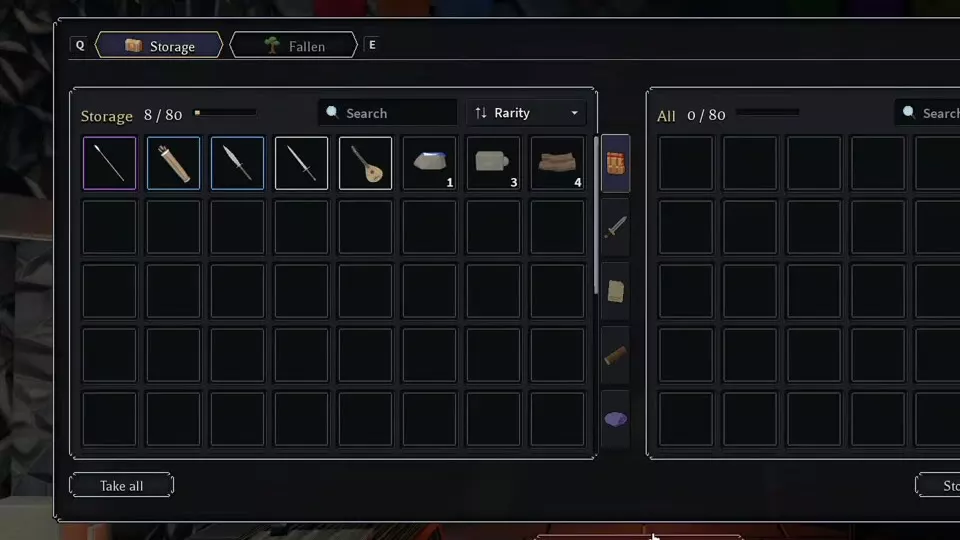
At the castle, open Keep > Storage. The left panel holds stored items and the right panel holds carried items. Move items between them individually or with the bulk controls. Completed Market purchases go to Storage. Items left there, along with buildings, upgrades, Gold, and Jewels, remain after a character wipe.
Keep Storage and Inventory
From the castle, open Keep > Storage. The left panel is your Keep Storage; the right panel is your carried-item inventory. At Tier 1, Storage has 80 slots, and the carried-item panel also has 80 slots.
Open Character > Inventory to inspect carried equipment and access its actions. An item tooltip offers Shift Compare and Click Actions.
Search and Transfer Controls
Use the search boxes, category filters, and Rarity sorting to find items in the two panels.
- Drag a carried item from right to left to deposit it. Select a stored item to transfer it into the carried panel.
- Take all withdraws stored items.
- Store materials deposits materials.
- Store all moves the items in the right-hand list into Storage.
The slot counters update as items move. Stackable materials such as Bone can join an existing stack.
Deposit, Withdraw, and Find Purchases
- Return to the castle and open Keep > Storage.
- Find the item in the right-hand panel to deposit it, or in the left-hand Storage panel to withdraw it. Use search or a category filter if needed.
- Transfer the individual item, or use a bulk control for the items you want to move. Check the destination panel and its counter after the transfer.
- To inspect or use withdrawn equipment, open Character > Inventory.
Completed Market purchases go to Keep Storage. If a purchase is missing from your carried inventory, look in the left-hand Storage panel and withdraw it. For a direct trade, deposit the items first: the Trading Post draws available trade items from Storage.
What Remains After a Wipe
Items left in Keep Storage remain after a character wipe. Your base's buildings and upgrades, Gold, and Jewels also remain. Before a wipe, move any rare items you want to preserve from your carried inventory into Storage.
Trading and Run Recovery
Use the Market guide for buying and orders, or the Trading Post guide for direct exchanges and gifts. For lives, defeat, and returning home, see Death, Lives, and Campfires.