
Fallen Lineage Stats, Scaling, and Critical Chance
Last updated:
Match your stats to your skills before spending points. Strength, Agility, Magic, and Spirit affect different parts of your character, while combat previews show how a selected skill applies to its current target.
Check a skill’s scaling attribute under Character → Skills, then allocate available Points under Character → Stats and select Confirm. Strength, Agility, and Spirit each add 1% damage and healing per point to matching skills. Critical chance starts at 5% plus 0.1 percentage points per Agility; a single 50% more modifier multiplies the existing chance by 1.5. Ward reduces elemental damage, and Tenacity provides a chance to resist harmful statuses.
Attributes and Skill Scaling
The Skill power bonus from Strength, Agility, or Spirit applies to skills that scale with that attribute. Match your investment to the scaling label on the skills you use rather than treating every attribute as a universal damage bonus.
The secondary benefits help decide between damage, survivability, and resources. Strength also supplies maximum HP, so investing in a Strength-scaled attack improves both its power and your health pool. Agility adds critical-hit chance alongside its matching skill bonus. Spirit combines matching skill power with Status power and a chance to gain 1 extra Energy each turn. Its Energy bonus increases the chance of that extra point; it does not grant extra Energy unconditionally. Magic contributes to Skill power and Ward.
4 objects
| Name | Skill power per point |
|---|---|
|
1 % (Skills that scale with Strength)
| |
| |
|
1 % (Skills that scale with Agility)
| |
| |
|
1 % (Skills that scale with Spirit)
| |
| |
| — | |
| |
Read Your Skill and Character Panels
Find the scaling attribute
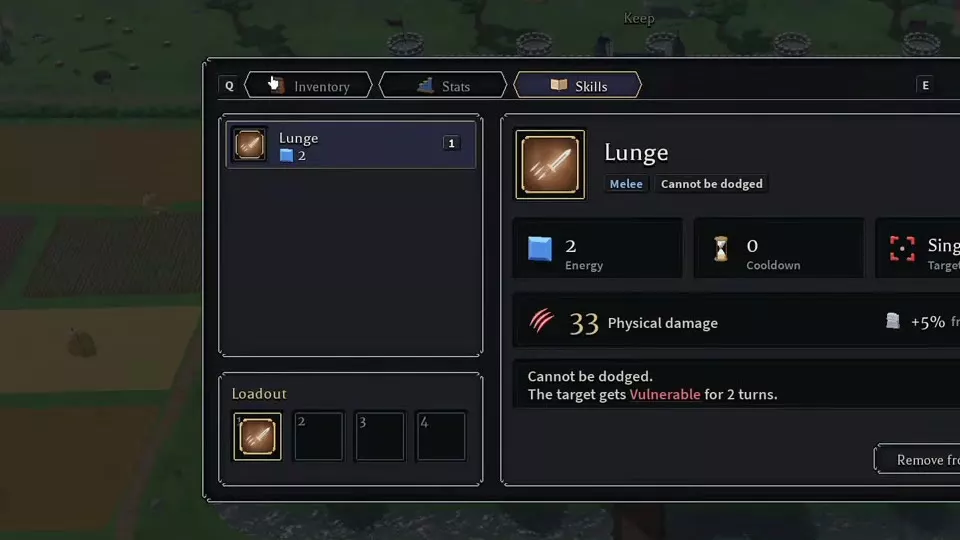
Open Character → Skills and select a skill. Read the attribute contribution beside its damage or healing value. Lunge, for example, displays a contribution from Strength. Use that label to identify the stat that improves the skill.
Inspect your character totals
Open Character → Stats to inspect the Defence, Offence, and Other summaries. These include Max HP, Armor, Ward, Dodge, Block, Tenacity, Crit chance, Crit damage, Status power, Energy chance, Max Energy, and Healing done. Hover over an attribute term to read its tooltip. During a fight, use the Stats button to inspect combat stats.
Read the selected target’s preview
In combat, select a skill and target to inspect damage, hit chance, critical-hit chance, block chance, and the displayed scaling contribution. These values describe that action against that target; the character’s general Crit chance does not replace a skill-specific preview.
Read hit and block separately. Lunge’s Cannot be dodged property does not prevent a target from blocking it. Check the preview again when changing targets. For the full turn controls and skill-check timing, use the combat guide.

Critical Chance: Flat, Increased, and More
Base chance and Agility
Before increased or more modifiers, calculate critical-hit chance as:
Critical chance (%) = 5 + 0.1 × Agility
The base chance is 5%. Each point of Agility adds 0.1 percentage points, so 10 Agility adds 1 percentage point and produces a 6% starting chance before increased or more modifiers. Use the Agility value for the character configuration you are evaluating.
Relative bonuses
Bonuses labeled increased or more modify the probability rather than adding their printed number as percentage points. A single 50% more critical-hit chance bonus multiplies the existing chance by 1.5:
10.8% × 1.5 = 16.2%
That is a gain of 5.4 percentage points, not 50 percentage points. This calculation applies one 50% more modifier to an existing 10.8% chance.
To inspect a skill-specific critical bonus, enter a run, select the skill in combat, and read its critical-hit chance in the target preview. Use the passive tree reference to compare node bonuses and their equipment conditions.
Allocate and Reset Stats
- Open Character → Stats.
- Check your available Points and the scaling attribute used by your current skills. You need available Points to increase an attribute.
- Select the plus control beside Strength, Agility, Magic, or Spirit.
- Review the updated attribute values, associated bonuses, and remaining Points.
- Select Confirm to apply the allocation.
The same Stats panel provides Reset for changing an existing allocation. Use that entry when you want to revisit your stat choices.

Ward and Tenacity
Ward: elemental damage reduction
For a nonnegative Ward value W, elemental damage reduction is:
Reduction = min(0.8, W / (W + 100))
Multiply the result by 100 to express it as a percentage. At 100 Ward, the calculation is 100 / 200 = 0.5, giving 50% elemental damage reduction. The reduction caps at 80%.
This formula applies to Ward’s reduction of incoming elemental damage. Do not use it to calculate Armor’s damage reduction.
Tenacity: harmful-status resistance
Tenacity is the chance to resist each harmful status, capped at 60%. It addresses status application rather than reducing elemental hit damage. Choose Ward to reduce incoming elemental damage and Tenacity to resist harmful statuses; they protect against different parts of an enemy’s attack.
Ward and Tenacity
Ward
- Damage type
-
Elemental
- Damage reduction formula
-
W / (W + 100) fraction (Incoming elemental damage) W is the character's nonnegative Ward value. The resulting reduction is capped at 0.8, equivalent to 80%.
- Damage reduction cap
-
80 % (Incoming elemental damage)
Tenacity
- Effect
-
Harmful-status resistance The chance to resist each harmful Status.
- Resistance chance cap
-
60 %
- Display location
-
Stats tab

Apply Stats to a Build
- Strength Lancer build: combine Strength-scaled attacks with single-target damage choices and recovery.
- Bard support build: choose stats around skill scaling, then combine buffs, healing, and control with the right instrument and nodes.
- Archer critical build: combine Agility and conditional critical bonuses around Aimed Shot.